Just call or text
No apps to learn, no commands to remember. Speak or write in your own words — Atlas asks the right questions and takes it from there.
AI that talks, listens, and serves
Take the busy out of business.
Atlas is the assistant you talk to like a person — on the phone or by text. Tell it what’s on your mind: paperwork, emails, client follow-ups, bookings, taxes, reservations. It has a conversation with you, then it gets it done.
What it does
Talk to Atlas the way you’d talk to a helpful assistant — then get back to work.
No apps to learn, no commands to remember. Speak or write in your own words — Atlas asks the right questions and takes it from there.
Your clients, your suppliers, your preferences — even the thing you mentioned last week. You won’t have to repeat yourself.
Paperwork, invoices, emails, client follow-ups, bookings and reservations. If it’s on your list, hand it over.
Works with any email, calendar, and contacts — so your messages, appointments and to-dos come together in one conversation.
Atlas rings or texts when something needs you — a confirmation, an answer, a decision — before it becomes a problem.
Your details stay yours. Atlas uses your information to help you and nothing else — and you can delete anything, any time.
How it works
Four steps. One conversation.
Reach Atlas like you’d reach a colleague — dial the number, or send a text.
In your own words. “Chase the invoice.” “Book a table.” “Send the contract.”
It writes, calls, books, fills in forms and follows up — quietly, in the background.
A text or a ring when it’s handled — or if there’s a decision only you can make.
Examples
A few of the things busy owners ask Atlas for every day.
Connects to any email, calendar and contacts. No switching. No new software to learn. And if you’re not sure it can do something — just ask.
In real life
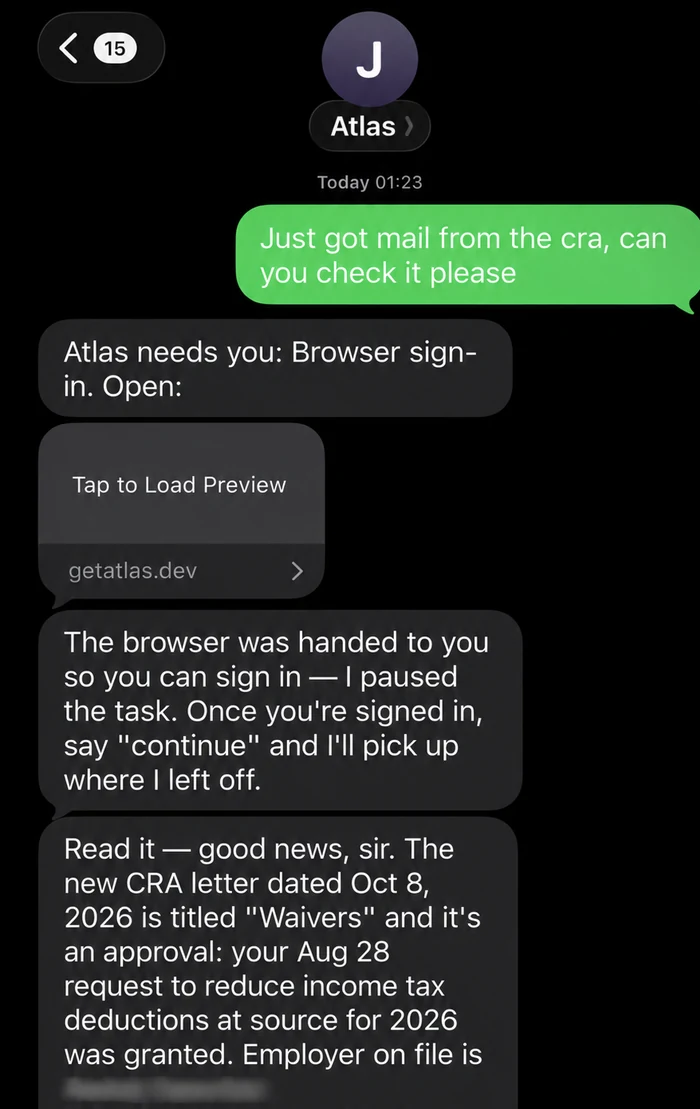
A business owner asks Atlas to check a letter from the tax office. Atlas reads it, explains what it means, and says what to do next.
A real text conversation, lightly cropped. Details hidden.
FAQ
A personal assistant you call or text — like a helpful colleague who never gets overwhelmed. You talk, Atlas works.
Not at all. If you can make a phone call or send a text message, you can use Atlas. There’s nothing to install and nothing to learn.
Everyday business admin: paperwork, emails, client follow-ups, invoices, bookings, reservations, research, reminders — and plenty more. If you’re unsure, just ask.
Yes. Atlas connects to any email, calendar, and contacts — so it works with the tools you already use, without changing anything.
Atlas texts or calls with a short update. If a decision is needed, it asks — it only contacts you when there’s a reason.
Your details stay yours. Atlas uses your information to help you and nothing else — and you can delete anything, any time.
Pricing will be announced with the beta. Atlas is opening quietly with a small first group, and sign-ups aren’t open yet — when there’s room, this page will have the door.
Atlas is opening quietly with a small first group. No sign-ups yet — when there’s room, you’ll find the door right here.
Sign-ups opening soon